
CLAWDBOT 🦞
“EXFOLIATE! EXFOLIATE!” — A space lobster, probably
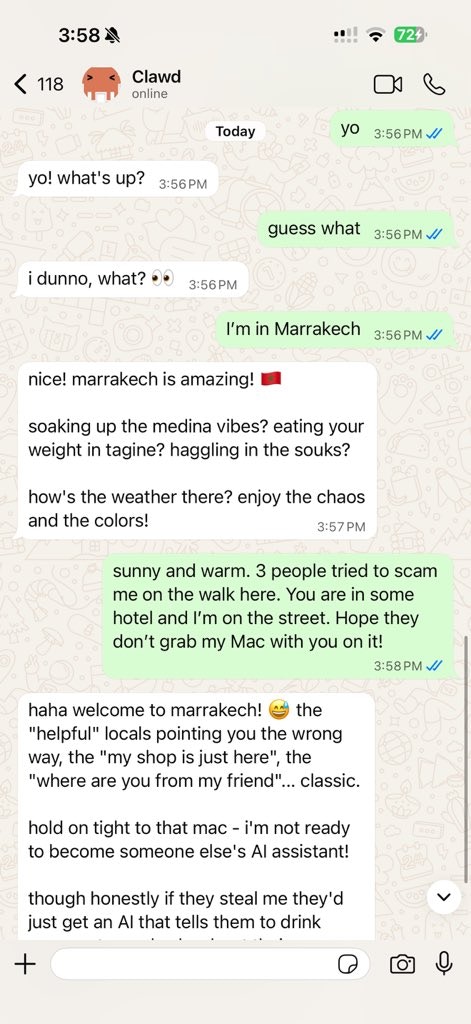
Any OS + WhatsApp/Telegram/Discord/iMessage gateway for AI agents (Pi).
Send a message, get an agent response — from your pocket.
GitHub · Releases · Docs · Clawd setup
CLAWDBOT bridges WhatsApp (via WhatsApp Web / Baileys), Telegram (Bot API / grammY), Discord (Bot API / discord.js), and iMessage (imsg CLI) to coding agents like Pi. It’s built for Clawd, a space lobster who needed a TARDIS.Start here
- New install from zero: https://docs.clawd.bot/start/getting-started
- Guided setup (recommended): https://docs.clawd.bot/start/wizard (
clawdbot onboard) - Open the dashboard (local Gateway): http://127.0.0.1:18789/ (or http://localhost:18789/)
clawdbot gateway.
Dashboard (browser Control UI)
The dashboard is the browser Control UI for chat, config, nodes, sessions, and more. Local default: http://127.0.0.1:18789/ Remote access: https://docs.clawd.bot/web and https://docs.clawd.bot/gateway/tailscaleHow it works
clawdbot gateway), a single long-running process that owns provider connections and the WebSocket control plane.
Network model
- One Gateway per host: it is the only process allowed to own the WhatsApp Web session.
- Loopback-first: Gateway WS defaults to
ws://127.0.0.1:18789.- For Tailnet access, run
clawdbot gateway --bind tailnet --token ...(token is required for non-loopback binds).
- For Tailnet access, run
- Bridge for nodes: optional LAN/tailnet-facing bridge on
tcp://0.0.0.0:18790for paired nodes (Bonjour-discoverable). - Canvas host: HTTP file server on
canvasHost.port(default18793), serving/__clawdbot__/canvas/for node WebViews; seedocs/configuration.md(canvasHost). - Remote use: SSH tunnel or tailnet/VPN; see
docs/remote.mdanddocs/discovery.md.
Features (high level)
- 📱 WhatsApp Integration — Uses Baileys for WhatsApp Web protocol
- ✈️ Telegram Bot — DMs + groups via grammY
- 🎮 Discord Bot — DMs + guild channels via discord.js
- 💬 iMessage — Local imsg CLI integration (macOS)
- 🤖 Agent bridge — Pi (RPC mode) with tool streaming
- ⏱️ Streaming + chunking — Block streaming + Telegram draft streaming details (/concepts/streaming)
- 🧠 Multi-agent routing — Route provider accounts/peers to isolated agents (workspace + per-agent sessions)
- 🔐 Subscription auth — Anthropic (Claude Pro/Max) + OpenAI (ChatGPT/Codex) via OAuth
- 💬 Sessions — Direct chats collapse into shared
main(default); groups are isolated - 👥 Group Chat Support — Mention-based by default; owner can toggle
/activation always|mention - 📎 Media Support — Send and receive images, audio, documents
- 🎤 Voice notes — Optional transcription hook
- 🖥️ WebChat + macOS app — Local UI + menu bar companion for ops and voice wake
- 📱 iOS node — Pairs as a node and exposes a Canvas surface
- 📱 Android node — Pairs as a node and exposes Canvas + Chat + Camera
Quick start
Runtime requirement: Node ≥ 22.Configuration (optional)
Config lives at~/.clawdbot/clawdbot.json.
- If you do nothing, CLAWDBOT uses the bundled Pi binary in RPC mode with per-sender sessions.
- If you want to lock it down, start with
whatsapp.allowFromand (for groups) mention rules.
Docs
- Start here:
- Docs hubs (all pages linked)
- FAQ ← common questions answered
- Configuration
- Slash commands
- Multi-agent routing
- Updating / rollback
- Pairing (DM + nodes)
- Nix mode
- Clawd personal assistant setup
- Skills
- Skills config
- Workspace templates
- RPC adapters
- Gateway runbook
- Nodes (iOS/Android)
- Web surfaces (Control UI)
- Discovery + transports
- Remote access
- Providers and UX:
- Companion apps:
- Ops and safety:
The name
CLAWDBOT = CLAW + TARDIS — because every space lobster needs a time-and-space machine.“We’re all just playing with our own prompts.” — an AI, probably high on tokens
Credits
- Peter Steinberger (@steipete) — Creator, lobster whisperer
- Mario Zechner (@badlogicc) — Pi creator, security pen-tester
- Clawd — The space lobster who demanded a better name
Core Contributors
- Maxim Vovshin (@Hyaxia, [email protected]) — Blogwatcher skill
- Nacho Iacovino (@nachoiacovino, [email protected]) — Location parsing (Telegram + WhatsApp)
License
MIT — Free as a lobster in the ocean 🦞“We’re all just playing with our own prompts.” — An AI, probably high on tokens